



WorkStation/ Check Box Sign-In
Access to myctb.org.
Community Tool Box Online Training

From the providers of the Community Tool Box at the University of Kansas comes this exciting opportunity to learn 16 core competencies for your collaborative efforts at your own pace. Find out more.
Capacity Building Training

People taking action need skills in core areas including assessment, planning, advocacy, evaluation, and sustainability. We have decades of experience teaching and stimulating use of basic community competencies; online, and through in-person workshops, webinars, and classes.
Community Tool Box Training Curriculum

Based upon demand for training, we have developed a training curriculum on the sixteen core competencies for promoting community health and development. You can purchase these training materials for use in your own trainings or you can contract with our experienced staff to conduct trainings for you in person or via webinar. We can also employ a “train the trainer” approach.
Each of these 16 field-tested training modules consists of well-developed participant guides with complete with interactive activities and adaptable facilitator guides and PowerPoint. Just-in-time support materials remain freely available to participants after trainings via the Community Tool Box Toolkits.
Evaluation

We believe that evaluation should be participatory – used to help shape the initiative over time, not just a one-time summative judgment at the end of the initiative. We provide support and evaluation services for local, state, national, and international initiatives, and our staff has decades of experience supporting community-based research and evaluation.
Community Check Box Evaluation System

We have been evaluating community health initiatives for more than 20 years. Based on this experience, we created a Community Check Box Evaluation System to support documentation and evaluation of initiatives (local, state, national, and global). In collaboration with communities, foundations, and governmental agencies, we developed hundreds of customized online systems for a variety of initiatives working to bring about change and improvement.
The Community Check Box Evaluation System includes supports for documenting your data, creating online graphs and reports, engaging in reflection and sensemaking around your data, and linking to online supports for improvement. The system is highly customizable for each client, depending on clients’ particular evaluation questions and what they need to know.
These resources help form a unique and powerful infrastructure for supporting and evaluating community initiatives.
Build Your Toolbox
The Community Tool Box offers thousands of pages of practical guidance for community change efforts. We'd love to partner with your organization to deliver these resources for implementation to those you serve through a “mashup,” integrating curated tools and guidance for implementation with your organization's framework for change.
Facilitation of Community Processes
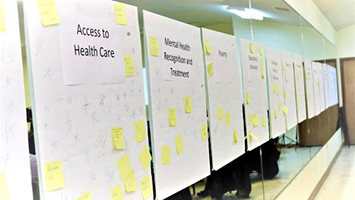
We provide facilitation for many community action processes. Our experience includes small and large group facilitation, including coalition meetings, board retreats, town hall meetings/ listening sessions, focus groups, PhotoVoice initiatives, and collaborative community planning.
Community Health Assessment and Planning

We employ a multi-method, collaborative approach to assessing community needs and resources which includes conducting focus groups, key informant interviews, local public health system assessments, community concerns surveys, review of key community health status indicators, small area analysis, and PhotoVoice. We support data analysis for converging themes and help communities prioritize issues to create conditions for promoting health.